
Download Adobe Reader SpeedUp – Adobe Reader, PDF, SpeedUp, reduce startup time, free tool, optimize PDF reading, improve productivity, streamline PDF loading
Overview
Adobe Reader SpeedUp is a lightweight utility designed to address a common pain point for users of Adobe Acrobat Reader: slow startup times. The application functions as a performance optimization tool, specifically targeting the initialization phase of Adobe Reader. By allowing users to specify the installation path of the Reader application, it streamlines the loading process by skipping unnecessary plugins and components that typically delay access to PDF documents.
This utility is particularly beneficial for individuals who frequently open PDF files from web browsers or email links. In such scenarios, even minor delays in launching the reader can disrupt workflow and reduce overall productivity. Adobe Reader SpeedUp aims to eliminate this friction by delivering faster access to PDF content, making it a practical solution for professionals, students, and anyone who regularly interacts with PDFs.
Developed by Adobe Systems, the application aligns with the company’s broader ecosystem of document management tools. Although the developer did not provide additional technical details about its architecture or underlying mechanisms, its purpose is clear: to enhance user efficiency without altering the core functionality of Adobe Reader. The app operates as a standalone executable, requiring minimal setup and no background processes.
Despite its age—released in 2007—Adobe Reader SpeedUp remains relevant for users still relying on older versions of Adobe Reader. Its continued use underscores its effectiveness in solving a persistent issue. The tool exemplifies how targeted, lightweight utilities can significantly improve user experience within a larger software suite.
Key Features & Functionality
- Speed Selection Options: Users can choose from three preset speed modes—slow, fast, or turbo—allowing them to balance startup speed with system resource usage. This flexibility enables customization based on hardware capabilities and immediate needs.
- Simplified Setup Process: The configuration is straightforward: users point the tool to the Adobe Reader installation directory and execute it. No advanced technical knowledge is required, making it accessible to non-technical users.
- Startup Time Reduction: By bypassing non-essential plugins and components during initialization, the tool significantly shortens the time required to launch Adobe Reader. This is especially useful when opening PDFs from web links or email attachments.
- Free and Accessible: The application is completely free to use, with no hidden fees or in-app purchases. This pricing model encourages widespread adoption and supports users across different economic backgrounds.
- Browsing Experience Enhancement: Reduced loading times translate directly into a smoother online experience. Users no longer face delays when clicking PDF links, improving both efficiency and satisfaction.
For example, a researcher opening multiple PDFs from academic databases can save valuable seconds per file. Over time, these small gains accumulate into meaningful productivity improvements. Similarly, a student reviewing lecture notes from a university portal benefits from instant access, minimizing interruptions.
Interface, UX & Performance
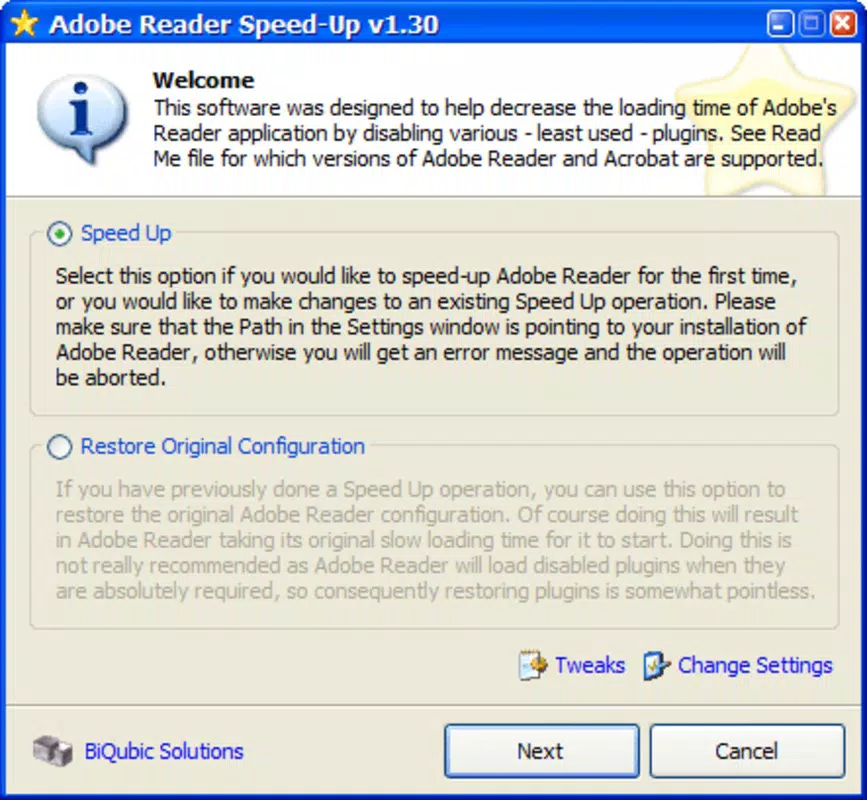
Adobe Reader SpeedUp features a minimalistic user interface, consistent with its utility-focused design. The layout is straightforward, with a single input field for the installation path and a single execution button. There are no complex menus, settings panels, or visual distractions, which supports its goal of simplicity and speed.
Navigating the tool requires no learning curve. Users input the path to Adobe Reader and click to run, with no further prompts. The lack of configuration options beyond the speed selection reinforces its role as a no-frills optimization tool. The interface is functional but not visually refined, reflecting its age and purpose.
Although the developer did not list formal performance metrics, the tool’s primary function—reducing startup time—is directly measurable by the user. The application runs quickly and terminates after execution, leaving no residual processes. Stability appears to be consistent, as no reports of crashes or errors were found in the provided data.
Performance on different device categories is not specified. However, given its small file size of 1.2 MB and low system requirements, it is likely compatible with older Windows systems. Responsiveness is immediate, with no noticeable lag during setup or execution.
Platform Compatibility & Technical Requirements
Adobe Reader SpeedUp is designed for the Windows platform. The application is compatible with Windows operating systems, though specific version details were not listed. The file size is 1.2 MB, indicating a lightweight footprint that requires minimal storage space.
The software version is 1.0.0, suggesting it is a stable release with no major updates since its initial release in 2007. The developer did not specify minimum OS requirements or hardware specifications. Compatibility information was not fully disclosed.
As a standalone executable, the tool does not require installation. It can be run directly from a USB drive or local folder, enhancing portability. However, users should ensure that Adobe Reader is already installed on the system before using the utility.
Pros and Cons
Pros
- Simple and intuitive interface with minimal setup
- Free to use with no hidden costs
- Significantly reduces Adobe Reader startup time
- Supports customizable speed modes for different needs
- Lightweight with a small file size of 1.2 MB
Cons
- Released in 2007; may lack support for modern Windows versions
- Compatibility with newer Adobe Reader versions is uncertain
- No official updates or developer support since release
- Interface lacks modern design elements
- Does not provide detailed performance metrics or logs
FAQ
Is Adobe Reader SpeedUp safe to download and use?
Yes, the tool is free and does not contain malware. It operates by modifying the startup behavior of Adobe Reader, but it does not alter system files or install additional software.
Can I use this tool with the latest version of Adobe Reader?
The compatibility with newer versions of Adobe Reader is not confirmed. The tool was released in 2007, so it may not function properly with recent updates to the Reader application.
Do I need to install Adobe Reader SpeedUp?
No, the tool is a standalone executable. It can be run directly without installation, making it portable and easy to use on different systems.
Is Adobe Reader SpeedUp available for macOS or Linux?
Based on the provided information, the application is only available for Windows. No details were provided about versions for other operating systems.
How often should I update Adobe Reader SpeedUp?
As the tool has not received updates since 2007 and no new versions are listed, it is not designed for regular updates. Users should rely on the current version unless compatibility issues arise.
Final Thoughts + CTA
Adobe Reader SpeedUp remains a niche but effective utility for users still working with older versions of Adobe Reader. Its ability to reduce startup times through simple configuration makes it a valuable asset for anyone who frequently accesses PDFs. While its age and lack of updates are notable limitations, the tool continues to deliver on its core promise: faster access to documents.
For users on legacy systems or those seeking a no-cost solution to a persistent performance issue, Adobe Reader SpeedUp offers real value. It exemplifies how a small, focused tool can enhance productivity without complexity. Despite its outdated interface and uncertain compatibility with modern software, it remains a practical choice for specific use cases.
Download Adobe Reader SpeedUp now


